Features Overview
Categories:
Features Overview
This document details the custom, project-specific features that make Peregrine unique. These features distinguish the application from standard boilerplate and represent the core innovation of the project.
Custom Features (Project-Specific)
1. H3 Hexagonal Map System
Purpose: Organize and visualize global phenomena data using spatial indexing
Overview: The H3 system divides Earth into hexagonal cells at multiple resolution levels, enabling efficient geospatial queries and visualization of phenomena data.
Key Capabilities:
- Global Coverage - Hierarchical hexagonal tessellation from continental to neighborhood scale
- Resolution Levels - 16 resolution levels (0 = continents, 15 = individual buildings)
- Efficient Queries - Quickly find phenomena in specific regions without scanning entire dataset
- Visual Overlay - Display hexagonal grid on map for intuitive spatial understanding
- User Interaction - Tap cells to view phenomena, filter by cell regions
- Polar Fade Effect - Automatic fade at polar regions using smoothstep function
Technology Stack:
- Mapbox GL 10.2.10 for rendering
- H3-JS 4.4.0 & H3 2.0.1-rc.8 for geospatial calculations
- React Native map integration
MapScreen Implementation:
MapScreen.tsx
├── Mapbox GL Map Component
│   ├── Base map rendering
│   └── Phenomenon markers
├── HexGlobeWireframe.tsx
│   ├── Hex tessellation overlay
│   ├── Polar fade effect
│   └── Resolution-based rendering
└── HexSelectionOverlay.tsx
    ├── Tap detection
    ├── Coordinate to H3 conversion
    └── Selected cell highlighting
Components:
HexGlobeWireframe.tsx- Renders global H3 hexagonal tessellationHexSelectionOverlay.tsx- Interactive cell selectionPhenomMapStyle.ts- Custom map styling
Use Cases:
- Browse phenomena by geographic region
- Identify phenomenon clusters and hotspots
- Efficient data discovery without overwhelming user
- Dashboard visualization of activity patterns
Future Enhancements:
- Heat map visualization (intensity by phenomena count)
- Historical data visualization (time-based filtering)
- Predictive analysis (trajectory forecasting)
- Custom region creation for teams
2. EndlessMediaFeed Component
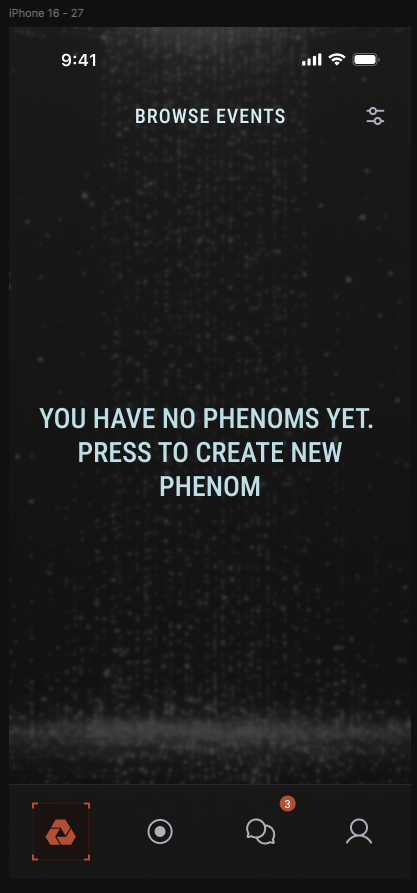
Purpose: Browse phenomena media with seamless infinite scrolling experience
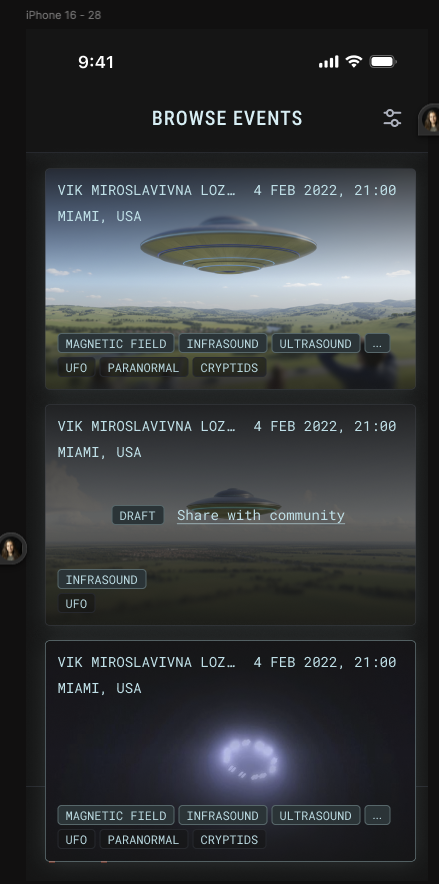
Overview: The EndlessMediaFeed is a custom React Native component that provides an engaging, infinite scroll experience for browsing phenomena media (videos, images, sensor data).
Key Capabilities:
- Infinite Scrolling - Automatically loads more content as user scrolls
- Performance Optimized - Renders only visible items (virtualization)
- Pull-to-Refresh - Manual refresh for latest content
- Media Display - Thumbnails, video previews, metadata
- Overlay System - Dynamic metadata overlays on media items
- Prefetch Loading - Image preloading for smooth scrolling
- Pagination Support - Cursor-based fetching for efficient data loading
- Touch Gestures - Press and long-press event handling
HomeScreen Integration:
HomeScreen
├── Header (Title, Filters, Settings)
├── EndlessMediaFeed
│   ├── Media Item Card
│   │   ├── Thumbnail/Video
│   │   ├── Metadata Overlay
│   │   │   ├── Reporter info
│   │   │   ├── Location
│   │   │   ├── Timestamp
│   │   │   └── Engagement metrics
│   │   └── Action Buttons
│   ├── Media Item Card
│   └── Loading Indicator
└── Navigation Footer
Component Features:
- Dynamic Rendering - Adapts to different media types (images, videos)
- Configurable Overlay - Custom renderOverlay and renderFooter props
- Error Handling - Graceful handling of load failures
- Loading States - Skeleton screens while loading
- Generic Type Support -
EndlessMediaFeed<T extends MediaItem>for type safety
Performance Optimizations:
- Virtualization: Only visible items rendered
- Memoization: Components avoid unnecessary re-renders
- Image Optimization: Lazy loading, compression
- Memory Management: Item cleanup when scrolled out of view
3. Domain Models
Purpose: Define core data structures for phenomena, users, and metadata
PhenomItem (Core Data Model)
interface PhenomItem {
  id: string;
  title: string;
  description: string;
  category: PhenomCategory;
  coordinates: PhenomCoords;
  mediaUrl: string;              // Video or image URL
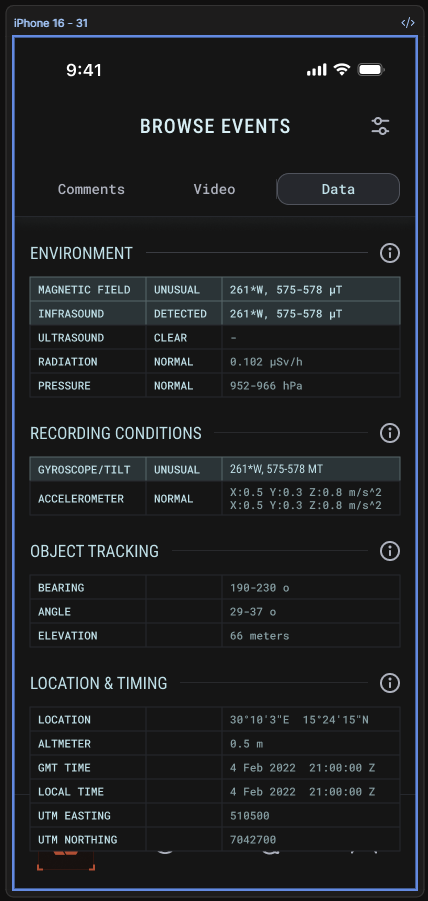
  sensorData: SensorReadings;    // Accelerometer, gyroscope, etc.
  timestamp: Date;
  reporter: PhenomProfile;
  tags: string[];
  verified: boolean;
  engagementMetrics?: {
    likes: number;
    comments: number;
    shares: number;
  };
}
PhenomCoords (Geospatial Data)
interface PhenomCoords {
  latitude: number;
  longitude: number;
  altitude?: number;
  h3Index: string;   // H3 hexagon index for efficient queries
}
PhenomCategory (Phenomenon Classification)
enum PhenomCategory {
  ELECTROMAGNETIC = 'electromagnetic',
  INFRASOUND = 'infrasound',
  UAP = 'uap',              // Unidentified Aerial Phenomena
  PARANORMAL = 'paranormal',
  CRYPTIDS = 'cryptids'
}

interface CategoryMetadata {
  id: PhenomCategory;
  name: string;
  description: string;
  icon: string;
  color: string;
}
PhenomProfile (User Profile)
interface PhenomProfile {
  id: string;
  username: string;
  avatar?: string;
  bio?: string;
  location?: string;
  verificationLevel: 'basic' | 'expert' | 'verified';
  recordingCount: number;
  followers: number;
}
PhenomUser (Full User Object)
interface PhenomUser {
  profile: PhenomProfile;
  authToken: string;
  email: string;
  preferences: UserPreferences;
}
SensorReadings (Device Sensor Data)
interface SensorReadings {
  accelerometer?: XYZData;
  gyroscope?: XYZData;
  magnetometer?: XYZData;
  barometer?: number;
  deviceMotion?: DeviceMotionData;
  timestamp: Date;
}

interface XYZData {
  x: number;
  y: number;
  z: number;
}
4. API Adapter Pattern
Purpose: Abstract backend communication for flexibility and testability
Overview: The API Adapter Pattern (Strategy Pattern) allows multiple backend implementations without changing application code. Currently implemented with MockDataAdapter; can be extended with REST, GraphQL, or other backends.
Architecture:
app/services/api/phenom/
├── base/
│   ├── PhenomAPI.ts           # Adapter holder/facade
│   ├── APIConnector.ts        # HTTP connector
│   └── APIConfig.ts           # Configuration
├── adapters/
│   ├── IAPIAdapter.ts         # Common adapter interface
│   ├── MockDataAdapter.ts     # Current implementation
│   └── test/                  # Test utilities
└── types/                      # TypeScript definitions
Adapter Interface:
// adapters/IAPIAdapter.ts
interface IAPIAdapter {
  // Phenomena queries
  getPhenoms(filters?: PhenomFilter): Promise<PhenomItem[]>;
  getPhenomById(id: string): Promise<PhenomItem>;
  getPhenomByLocation(coords: PhenomCoords, radius: number): Promise<PhenomItem[]>;
  getPhenomByH3Cell(h3Index: string): Promise<PhenomItem[]>;

  // User operations
  getUserProfile(userId: string): Promise<PhenomProfile>;
  updateUserProfile(profile: PhenomProfile): Promise<void>;

  // Recording operations
  uploadRecording(recording: RecordingData): Promise<string>;

  // Search and filtering
  search(query: string): Promise<PhenomItem[]>;
  getCategories(): Promise<PhenomCategory[]>;
}
Current Implementation: MockDataAdapter
// adapters/MockDataAdapter.ts
export class MockDataAdapter implements IAPIAdapter {
  private phenomena: PhenomItem[];

  constructor() {
    // Initialize with sample data
    this._initializeSampleData();
  }

  async getPhenoms(filters?: PhenomFilter): Promise<PhenomItem[]> {
    // In-memory filtering and sorting
    // Returns mock phenomenon data
  }

  async getPhenomByH3Cell(h3Index: string): Promise<PhenomItem[]> {
    // Query phenomena in specific hexagonal cell
  }

  // ... other methods
}
Usage in Components:
// Initialize in app.tsx
import { PhenomAPI } from '@/services/api/phenom/base/PhenomAPI';
import { MockDataAdapter } from '@/services/api/phenom/adapters/MockDataAdapter';

// Set current adapter
PhenomAPI.current = new MockDataAdapter();

// In a screen component
const MapScreen = () => {
  const [phenoms, setPhenoms] = useState<PhenomItem[]>([]);

  useEffect(() => {
    const loadData = async () => {
      const data = await PhenomAPI.current.getPhenoms();
      setPhenoms(data);
    };
    loadData();
  }, []);
};
Benefits:
- Testability - Mock implementations for unit tests
- Flexibility - Switch backends without app changes
- Separation of Concerns - API details isolated from UI
- Scalability - Add new adapters as needs evolve
- Team Development - Frontend team can work independently with mock data
Future Adapters:
- RESTAdapter - Connect to actual REST API backend
- GraphQLAdapter - GraphQL query support
- FirebaseAdapter - Firebase Realtime Database integration
- OfflineAdapter - Enhanced offline-first capabilities
5. Multi-Language Support
Purpose: Enable global user base with native language experiences
Overview: The application supports 7 languages using i18next, allowing users to interact with the app in their native language.
Supported Languages:
- English (en)
- Spanish (es)
- Arabic (ar) - with RTL support
- French (fr)
- Japanese (ja)
- Korean (ko)
- Hindi (hi)
Implementation:
File Structure:
app/i18n/
├── index.ts         # i18next configuration
├── en.ts            # English translations
├── es.ts            # Spanish translations
├── ar.ts            # Arabic translations (RTL)
├── fr.ts            # French translations
├── ja.ts            # Japanese translations
├── ko.ts            # Korean translations
├── hi.ts            # Hindi translations
├── demo-en.ts       # Demo content (English)
├── demo-es.ts       # Demo content (Spanish)
└── translate.ts     # Translation utility
Configuration:
// app/i18n/index.ts
import i18n from 'i18next';
import { initReactI18next } from 'react-i18next';

i18n.use(initReactI18next).init({
  fallbackLng: 'en',
  defaultNS: 'translation',
  resources: {
    en: { translation: enTranslations },
    es: { translation: esTranslations },
    ar: { translation: arTranslations },
    // ... other languages
  },
  interpolation: {
    escapeValue: false
  }
});
Usage in Components:
import { useTranslation } from 'react-i18next';

const PhenomCard = ({ item }: { item: PhenomItem }) => {
  const { t, i18n } = useTranslation();

  return (
    <View>
      <Text>{t('phenomena.title')}</Text>
      <Text>{t('phenomena.category')}: {t(`category.${item.category}`)}</Text>
      <Text>{t('phenomena.location')}: {item.coordinates.latitude}</Text>
    </View>
  );
};
Translation Keys Structure:
{
  "common": {
    "ok": "OK",
    "cancel": "Cancel",
    "back": "Back"
  },
  "phenomNavigator": {
    "homeTab": "Home",
    "recordTab": "Record",
    "chatTab": "Chat",
    "mapTab": "Map",
    "profileTab": "Profile"
  },
  "phenomCategories": {
    "electromagnetic": "Electromagnetic",
    "infrasound": "Infrasound",
    "uap": "UAP",
    "paranormal": "Paranormal",
    "cryptids": "Cryptids"
  }
}
RTL (Right-to-Left) Support:
// Automatic RTL detection for Arabic
import { I18nManager } from 'react-native';

// Enable RTL if Arabic selected
I18nManager.allowRTL(true);

// isRTL flag exported for conditional rendering
export const isRTL = I18nManager.isRTL;
Language Switching:
// Change language at runtime
const changeLanguage = async (lang: string) => {
  await i18n.changeLanguage(lang);
  // UI updates automatically
};
Benefits:
- Native language experience for users globally
- Easy to add new languages (add translation file)
- Centralized translation management
- Runtime language switching without app restart
- RTL support for Arabic and other RTL languages
Standard Features (Based on Ignite Boilerplate)
The following are standard features inherited from the Ignite boilerplate:
- Navigation Framework - React Navigation setup and structure
- Theming System - Color system, spacing, and typography infrastructure
- Component Library - Button, Card, Header, TextField, Icon, ListItem, Toggle components
- Authentication Flow - Login/logout framework (customized for Phenom)
- Error Handling - Global error boundaries
- Demo Screens - Showroom, Debug, Community, Podcast list screens
- Storage Utilities - MMKV wrapper utilities
- Configuration System - Base, dev, and prod configuration layers
Integration with Product Requirements
Features from PRD Implementation Status
Implemented/In Progress:
- ✅ Core application structure
- ✅ Category system (UAP, Cryptids, Paranormal, Electromagnetic, Infrasound)
- ✅ Geographic data visualization (H3 hexagonal map)
- ✅ User profiles (data structures)
- ✅ Media browsing (EndlessMediaFeed)
- ✅ Multi-language support (7 languages)
- ✅ Sensor data structures (PhenomCoords, SensorReadings)
- ⏳ Authentication (framework in place, needs backend)
In Development (Per User Research):
- ⏳ Video capture functionality (RecordScreen placeholder)
- ⏳ Instant app launch optimization (P0 priority per research)
- ⏳ AR object identification (P0 priority per research)
- ⏳ Recording with sensor metrics display
- ⏳ Post-recording editing capabilities
Planned (Per PRD):
- 📋 Backend API integration (replace MockDataAdapter)
- 📋 C2PA content authenticity (future implementation)
- 📋 User interaction rewards/rankings
- 📋 Desktop website
- 📋 3D trajectory visualization
- 📋 Advanced data analytics
- 📋 Team features
- 📋 Incident command view
Performance & Quality Metrics
Current Implementation Goals
Q4 2025 Targets:
80% unit test coverage
- <2s app launch time (critical per user research)
- Smooth 60fps scrolling in EndlessMediaFeed
- <100ms map cell response time
- <50MB app bundle size
Testing Coverage
- Components - Snapshot and interaction testing
- Hooks - Pure function testing
- Models - Data validation testing
- Adapters - Mock implementations for test isolation
- E2E Tests - Maestro test flows in
.maestro/flows/
Security Features
- C2PA Ready - Foundation for content authenticity (future implementation per PRD)
- Encrypted Storage - MMKV for sensitive data (auth tokens, user preferences)
- Type Safety - TypeScript strict mode prevents injection attacks
- Secure API Layer - HTTPS-only communication (when backend implemented)
- User Authentication - Secure credential management via AuthContext
Accessibility
- Multi-Language Support - 7 language translations
- RTL Support - Right-to-left layout for Arabic
- Screen Reader Ready - Proper semantic structure (to be enhanced)
- Color Contrast - WCAG considerations in design tokens
- Font Sizing - Responsive, readable typography
- Touch Targets - Adequate touch target sizes for mobile interaction
User Research Alignment
Key Findings from Research Analysis
Validated Priorities:
- Professional Scientific Identity - “Feel Like a Scientist” emotional job-to-be-done confirmed
- Quality Over Quantity - C2PA verification correctly positioned as P0
- Technical Sensor Data - Enhanced sensor display correctly positioned as P0
Gaps Addressed in Roadmap:
- Object Identification - Elevated to P0 priority (ranked #1 by survey respondents)
- App Launch Speed - Added as P0 requirement (<2s launch time)
- User Path Diversity - Progressive disclosure for both “unexpected sighting” and “research” paths
Retention Barriers Being Addressed:
- Launch speed optimization → Prevents missing unexpected sightings
- Video sharing capabilities → Addresses content ownership concerns
- AR object identification → Fills #1 user priority gap
- Filtering and search → Supports investigator workflow
Next Steps
Immediate Priorities (Based on User Research)
- Milestone 1: Instant launch capability with basic recording
- Milestone 2: Real-time object identification with verification
- Milestone 3: Complete recording-to-sharing workflow
Development Roadmap
- Replace MockDataAdapter with real backend integration
- Implement video capture with sensor overlay
- Add AR object identification system
- Implement C2PA content authenticity
- Optimize app launch time (<2s target)
- Complete testing coverage (>80% target)
Feedback
Was this page helpful?
Glad to hear it! Please tell us how we can improve.
Sorry to hear that. Please tell us how we can improve.